
Emi liano Assembly-7 Primitive Rhythmic Geometries
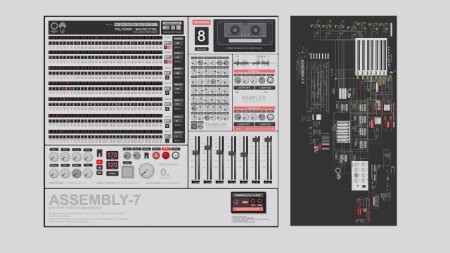
ASSEMBLY-7 is a Max/MSP patch. It is not a standalone application, not a VST plugin, not an AU plugin, and not a Max for Live device. It cannot be loaded inside Ableton Live as an instrument or effect.
COMPATIBLE WITH
MAX/MSP Full version - complete editing and control
MAX DEMO Free runtime from Cycling '74 - full functionality
SUPERCOLLIDER Free, open source, lightweight - required for the synthesis engine
No special installation is required beyond Max/MSP and SuperCollider. The setup is identical to the other tools in the same ecosystem: Endogen, Envion, and Interfera.
DUAL DSP ARCHITECTURE
ASSEMBLY-7 uses a dual DSP architecture. Max/MSP handles the sequencer, interface and user experience. SuperCollider handles all sound synthesis. The two systems communicate via OSC (Open Sound Control).
FIRST LAUNCH PROCEDURE
1 Install SuperCollider (free download from supercollider.github.io)
2 Open one of the included Engine files in SuperCollider:
engine_1.scd engine_2.scd engine_3.scd engine_4.scd
3 In SuperCollider, choose Language → Evaluate File. This loads the synthesis engine.
4 Open the ASSEMBLY-7 patch in Max/MSP. The system is ready.
Max/MSP manages the sequencer and interface. SuperCollider manages the synthesis. Once both are running, the machine is fully operational.
INTENDED WORKFLOW
ASSEMBLY-7 is designed as a generative drum machine for producing rhythmic material. The typical workflow is: play the machine, generate material, record the stems. The recorded files - master stereo, 7 synthesis stems, and 2 sampler stems - can then be imported into any DAW or production environment for further processing, mixing, and arrangement.
In practice, ASSEMBLY-7 is a material generator. It produces the raw rhythmic content that you then work with elsewhere.
Home page
DOWNLOAD