
No Mana Vocal Processing
Vocal Processing raw vocals are one of those things that takes probably just as much time as the rest of the mix itself. the process involves these main things, and i do them in this order:
tuning
editing (removing clicks, pops, managing breaths)
timing
effect processing
Tuning
pretty straightforward, but obviously not as straightforward as putting autotune on it however, which is a process where the effect aligns all pitches to the nearest note on a scale over time. personally i use wavestune (also similar to melodyne which you can also use), which is a more manual process where you can adjust all or each note that is sung. during this process you want to move any incorrect notes to the correct place and manage how "fast" you want those notes to correct. too fast and you'll sound like t pain, too slow and you won't get much correction if at all. as a standard, you want it fast enough so that the vocal's pitch sounds correct, but not to a point where it sounds too unnatural.
after you tune your vocals you want to bounce it into its own audio.
Editing
this is probably the most time consuming part and there's also some parts to this.
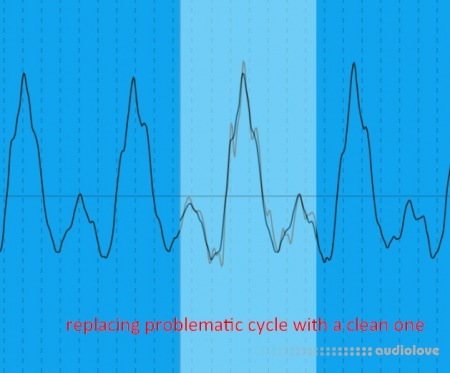
removing clicks and pops: i do this manually. while there are plugins such as waves x-click designed to remove clicks, i never find it thorough enough to remove all clicks and pops. before you dive into removing them, you def want to put rough (not light) processing so you get some idea of how your vocals will sound when processed. At the same time, you'll be able to hear pops and clicks more audibly assuming you're using some sort of multiband compression in your chain. when you go through the vocals, listen for clicks and pops - and when you do, find where it is on the waveform. what i like to do is use another identical part of the waveform where there is no pop, usually one or two cycles long, then copy/paste it over the pop to bandage it. you DEFINITELY want to make sure this is phase-aligned and fade-in your samples or else you'll run into other weird artifacts like thuds and maybe even more pops.
removing mouth smacks and transitional pops: these ones are typically in between words or syllables, especially when the vocalist is singing softly. you don't have to phase-align bandage like the previous tip for these since the section you're editing isn't usually tonal. 80% of the time i typically like to delete the problematic section entirely (since it's outside of any word or adlib), with the sample-ends faded. without these managed, and when running it through heavy compression (which most likely it will), these smacks can make the vocals sound uncomfortably wet.
managing breath sounds: these are sounds the vocalist typically makes when obtaining air in the lungs to sing the following line. when unmanaged, the vocals can sound like it's running a marathon, which usually isn't the easiest thing to listen to. depending on the breath, you can shorten them in length or simply lower the volume only if necessary.
setting gain on sections to manually adjust dynamics: if some parts of the vocal are too loud i would turn this down to your liking. this stage is so that you are evening out the volume manually so that the compressor doesn't do too much work.
after editing, you definitely want to bounce this into its own audio as well, so that when you time your vocal you're managing one audio and not several cut clips.
Timing
this one's full of trick questions, because vocals don't look like a drum loop where the transients are easily spottable and you can simply just move a warp marker to a quantized line. vocal samples will have swells and very short hills for sibilances - here are some tips:
during a swell, the vocalist is probably saying something like "will" or "run". i typically like to place the marker right at the beginning of the word before the R or W begin, and quantize that to your specific note. depending on the style, the W or R might act like a pickup segment, so the timing marker may be in the middle of the W or R.
for sibilances, vocalists may say stuff like "tonight". typically, i wouldn't place the marker at the "T", but actually the short space between the "T" and the "O", or right when the "O" starts. this is because in most cases, it rhythmically makes sense for the first sound of the vowel to be the beat. Of course ymmv and in some cases the "T" might be closer to the mark, so play around with this in mind and see what sound best to you.
you don't have to time every beat, sibilance or vowel. most of the time you'll probably just want to time the quarter or half notes, and let the rest of the notes do its own thing. if you try to be too forceful about every note they'll start to sound too unnatural, or you'll probably get lost in the sauce without realizing it which puts you in a position where you're certainly prone for vocalist notes saying "hey that's not what i intended!"
Effect Processing
vocals are probably the most effects-intensive sound in your project, because it's so dynamic and usually is in front of the mix. i never like to mention presets because every sound and every mix varies, but i do have a set chain i've been sticking with so far for raw vocals (in attachment). when applied, you won't hear a difference - you'll have to modify each setting accordingly. these are it explained in order of signal flow.
Pre-EQ: first i cut the lows (a SOFT knee right below the vocal's lowest fundamental), then i make large-bell changes to shape the overall tone - nothing surgical. any EQ works.
Limiter: settings are fast and threshold is high to catch rogue peaks - you don't want any post compressors to react to these. adjust accordingly (typically setting the threshold to the highest hill of the vocals)
Compressor: to control general dynamics. i typically like to set the threshold on top of the highest hills of the verses/breakdown.
De-esser: on the chain i provided, you'll see an audio effect rack split into two bands, and one of them is above 6khz which is where i'll manage the sibilances. on that high band is a utility (for gain) and a fast compressor (for de-essing). when you raise the gain , you typically want the highs of your vowels to sound nicely breathy and present, but not overbearing, harsh, or sizzly. during this gain-raising stage i am only listening to the vowels, and not the sibilances. then i will move on to the compressor to manage the sibilances. i typically like to place the threshold at the foothills of the sibilances (usually smashing them with aggressive ratio and speed settings). any lower and you'll probably get a lisp - you want to leave a little space to keep a natural sound. what i'll also do is reduce the wetness of the compressor accordingly, so now you're parallel compressing. the point of this is so that you get a bit of the raw sibilances and the compressed sibilances at the same time, as a result you retain both legibility of the words and the breathiness of the vowels.
Multi-band compression (ozone or some mastering multiband plugin recommended so you have more bands/settings, but you can still totally do it with stock multiband): here i'll focus more on the mids and control the dynamics of each band here. this totally depends on the vocal (and style) so i have less of a formula on where to set your bands and compressor settings. but obviously of something seems loud or unstable, you want to control that but at the same time not going overboard as to retain natural dynamic flow and vocal legibility. in harder music, multiband compression typically gets to OTT territory but in softer and even most pop music you want the vocals to breathe much more so that they pop out of the mix better. also, while we've also de-essed at this point, i'll sometimes still touch on the highs using light compression settings just as a general adjustment on this band to glue it to the mix better.
Post-EQ: this is where i'll make final adjustments to the tone, sometimes making small-q / surgical cuts. while you can do this with any eq, you might want to use linear/no-phase eq just so you don't get any phase issues - especially considering how upfront vocals are.
btw, this is just for the main vocals. you can certainly repeat this process for backing, doubles, harmonies and adlibs, but i find you can skip a few steps since they usually sit closer to the back in the mix. lastly, you can finally delay/reverb your vocals to your liking!
Home page
DOWNLOAD